Support report — product specification
This page is a short product specification for ArchiveMind's built-in
support-report generator. A first version already exists: the
support-bundle command and the Export diagnostics button on the
catalog error screen produce a privacy-conscious ZIP. This specification
records what the feature guarantees today and how a future, fully in-app
"Create Support Report" flow should behave.
Purpose
Let a non-technical user produce, in one click, a small file that gives support enough context to diagnose a problem — without hand-hunting through hidden folders and without leaking private data. Nothing is ever uploaded automatically; the user decides where the file goes.
What a support report includes
- App identity: ArchiveMind version and build identifier.
- Environment: operating system and version, architecture (Windows / Intel Mac / Apple silicon), Python runtime details.
- Health check: the built-in doctor report (launch/setup state, port availability, capability checks).
- Database summary: schema version, database file size, and a few high-level counts — never database contents.
- Repositories: repository count and availability states (online / offline / missing) — not their paths, unless the user explicitly opts in.
- Enrichment systems: which are enabled (thumbnails, visual search, media previews) and their status, including the visual-search model's load state.
- Recent errors: recent rotated log excerpts, sanitized — path redaction is on by default and replaces the home directory and indexed roots with stable placeholders.
- Basic runtime details: dependency summary (package names and versions), configuration summary (sanitized).
- A manifest and a privacy notice describing exactly what was collected; a component that fails to collect is recorded as an error rather than silently omitted.
What it excludes by default
- file contents, and the SQLite database itself;
- full extracted text;
- thumbnails, previews, and embeddings;
- complete filenames and exact personal paths (redacted placeholders instead);
- per-file hashes, search history, and saved queries;
- credentials, tokens, environment secrets, and the full unredacted configuration;
- arbitrary database contents or user files.
Consent rules
- Generating a report is always an explicit user action.
- Including anything from the exclusion list — for example unredacted paths, when a path is genuinely the problem — must require a separate, explicit opt-in at generation time, clearly labeled, defaulting to off.
- The report is written to a local file the user can inspect before sending. ArchiveMind never transmits it.
The in-app flow — how it works
The Create Support Report dialog is available from the main interface: Scan → Support → Create Support Report… (the error screen's Export diagnostics button opens the same dialog).
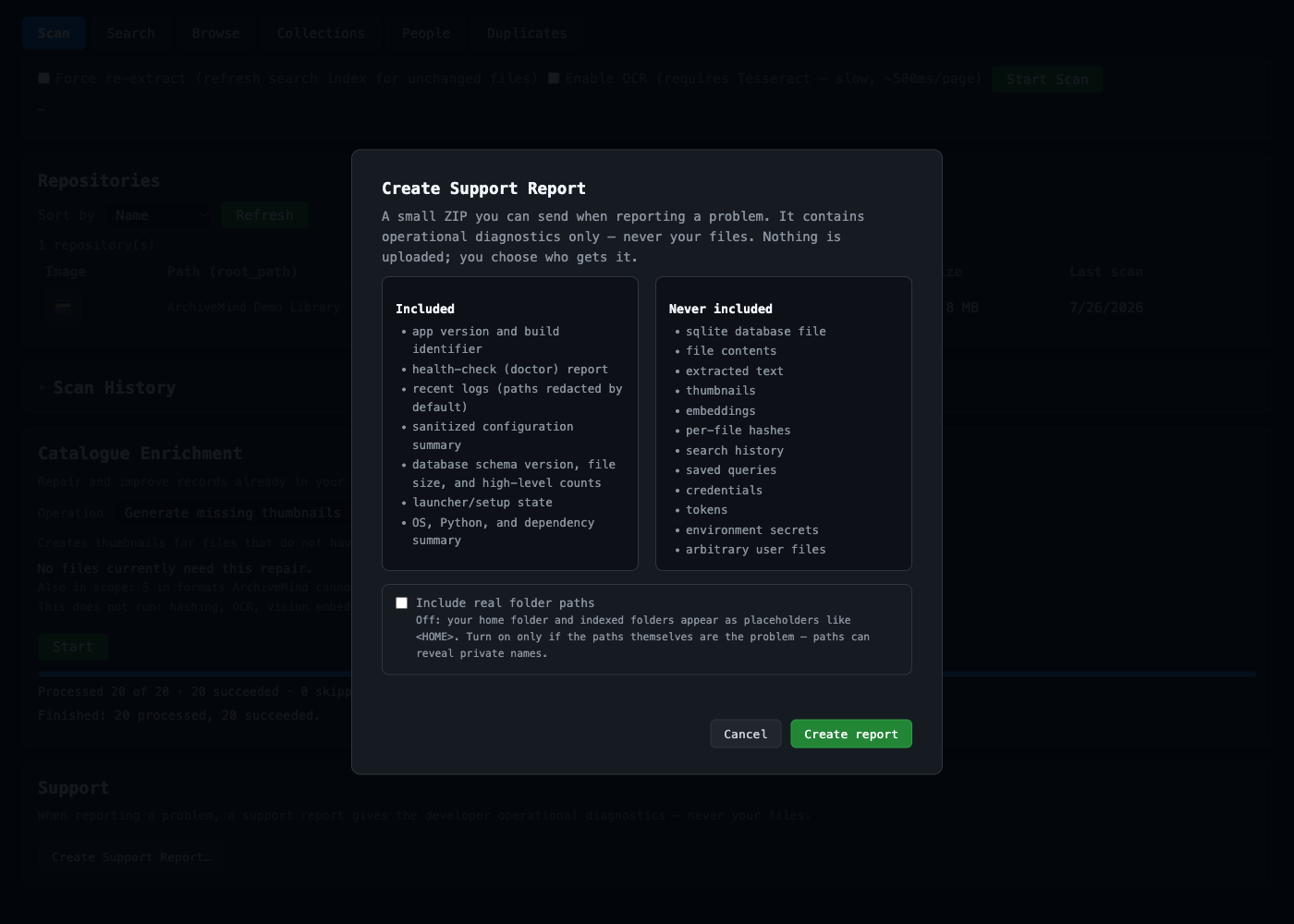
- Before anything is created, the dialog shows an "Included" and a "Never included" list — rendered from the collector's own manifest definitions, so what the screen promises cannot drift from what the ZIP contains.
- The single sensitive option — include real folder paths instead of placeholders — is a separate, default-off opt-in, and switching it on relabels the create button to "Create report with real paths" so the consequence is visible at the moment you click.
- When the report is saved, the dialog shows the file's location with a
one-click Reveal in Finder / Show in Explorer action, and reminds
you that
manifest.jsoninside the ZIP lists exactly what was collected. - If any diagnostic component could not be collected, the dialog says
so instead of overpromising — and a failed export offers the
command-line fallback (
archivemind support-bundle), which remains available for scripted use.